[:zh]
基本知识
类型的函数
我们都知道模板可以接受类型作为「参数」。同样地我们也可以有「返回值」,从而构造类型的函数。基本的范式是:
template<class T>
struct Computed {
  using type = T;
}
这就构造了一个名为 Computed 的,接收一个类型参数,返回这个类型本身的函数,用法如 Computed<float>::type,这个类型应当还是 `float`。
为什么要包一层 struct?这是因为 C++ 不支持对 using 的特化。这样的代码是不行的:
template <class T>
using computed<T> = T;

template<>
using computed<int> = double;
至于为什么不支持,我没有了解。
特化
什么是特化?你可以理解为模式匹配,就像 Haskell 中的写法一样。
template<class T>
struct Computed {
  using type = T;
}

template<>
struct Computed<int> {
  using type = double;
}
这样当你调用 Computed<bool>::type 时,得到的结果是 bool,而调用Computed<int>::type得到的结果却是double。当然这种匹配是遵循一定规则的,比如更「具体」的特化优先匹配,这跟 Haskell 谁在前谁先试着匹配不太一样。在 Haskell 中就好比:
data Type = Bool | Double | Int

computed :: Type -> Type
computed Int = Double
computed t = t
实际上有了这层对应,如果你知道怎么在 Haskell 中实现 Peano 数,那么 C++ 中的实现基本就是无脑翻译了。如果你不知道怎么在 Haskell 中实现 Peano 数,那你知道 Peano 数是什么,也能大差不差知道答案了。
Peano 数
Peano 数是什么?Peano 数是归纳定义的自然数,准确地说应该是一个表现形如直觉中「自然数」的公理系统,也就是「自然数」的形式化。这个系统里只有两个符号,Zero——表示 0,以及 Succ——表示后继。那么 1 就是 Succ<Zero>,2 就是 Succ<Succ<Zero>>,以此类推(归纳,其实就是「以此类推」的形式化)。
我们可以在 C++ 中如此表述:
struct Peano {};
struct Zero: Peano {};
template<class T>
struct Succ: Peano {};
那么加法又是什么呢?从例子出发,我们需要定义一个两个类型参数的模板:
template<class T1, class T2>
struct Add {
  using type = ???;
}
满足直觉中的运算规律,比如 2+1=3,翻译成 C++ 就是 Add<Succ<Succ<Zero>>, Succ<Zero>>::type = Succ<Succ<Succ<Zero>>>。当然类型之间没有等于号,准确地说应该用 std::is_same<T1, T2>,这其实也是通过特化实现的,比如(示意,非官方实现):
template<class T, class U>
struct is_same {
  static constexpr bool value = false;
};

template<class T>
struct is_same<T, T> {
  static constexpr bool value = true;
};
那么如何定义加法呢?对于有限的元素,我们当然可以为每一个实例做特化,比如:
template<>
struct Add<Succ<Succ<Zero>>, Succ<Zero>> {
  using type = Succ<Succ<Succ<Zero>>>;
}
也就是打表。C++ 编译器的模板深度一般都是有限的,所以这理论上是可以在实际操作中覆盖所有用例的。但是这明显太傻了。其实加法的定义只需要两条规则就可以覆盖:0 + b = b, (Succ a) + b = Succ (a + b)。翻译成 C++ 就是:
template<class T1, class T2>
struct Add;

template<class T>
struct Add<Zero, T> {
  using type = T;
};

template<class T1, class T2>
struct Add<Succ<T1>, T2> {
  using type = Succ<typename Add<T1, T2>::type>
};
注意那个 typename,gcc 并不知道后面那个 ::type 成员是类型还是变量,所以需要 typename关键字的提示。
这就算写完了,你可以测试看看,是不是满足 std::is_same<Add<Succ<Succ<Zero>>, Succ<Zero>>::type, Succ<Succ<Succ<Zero>>>>::value == true(需要 <type_traits> 头文件,或者上面自己写的那个模板(那就不用加 std::)。这么嵌套着写 Succ 太繁琐了,也不方便看,你可以简单地写一个模板来从整数生成类型:
template<int v>
struct peano {
  using type = Succ<typename peano<v - 1>::type>;
};

template<>
struct peano<0> {
  using type = Zero;
};
然后就可以去验证 Add<<peano<2>::type, peano<1>::type>::type 是不是等于 peano<3>::type 了。
至于加减乘除的其他运算,比较啊奇偶性啊其他的函数,只要你懂得了加法,恐怕就不难了。
练习:
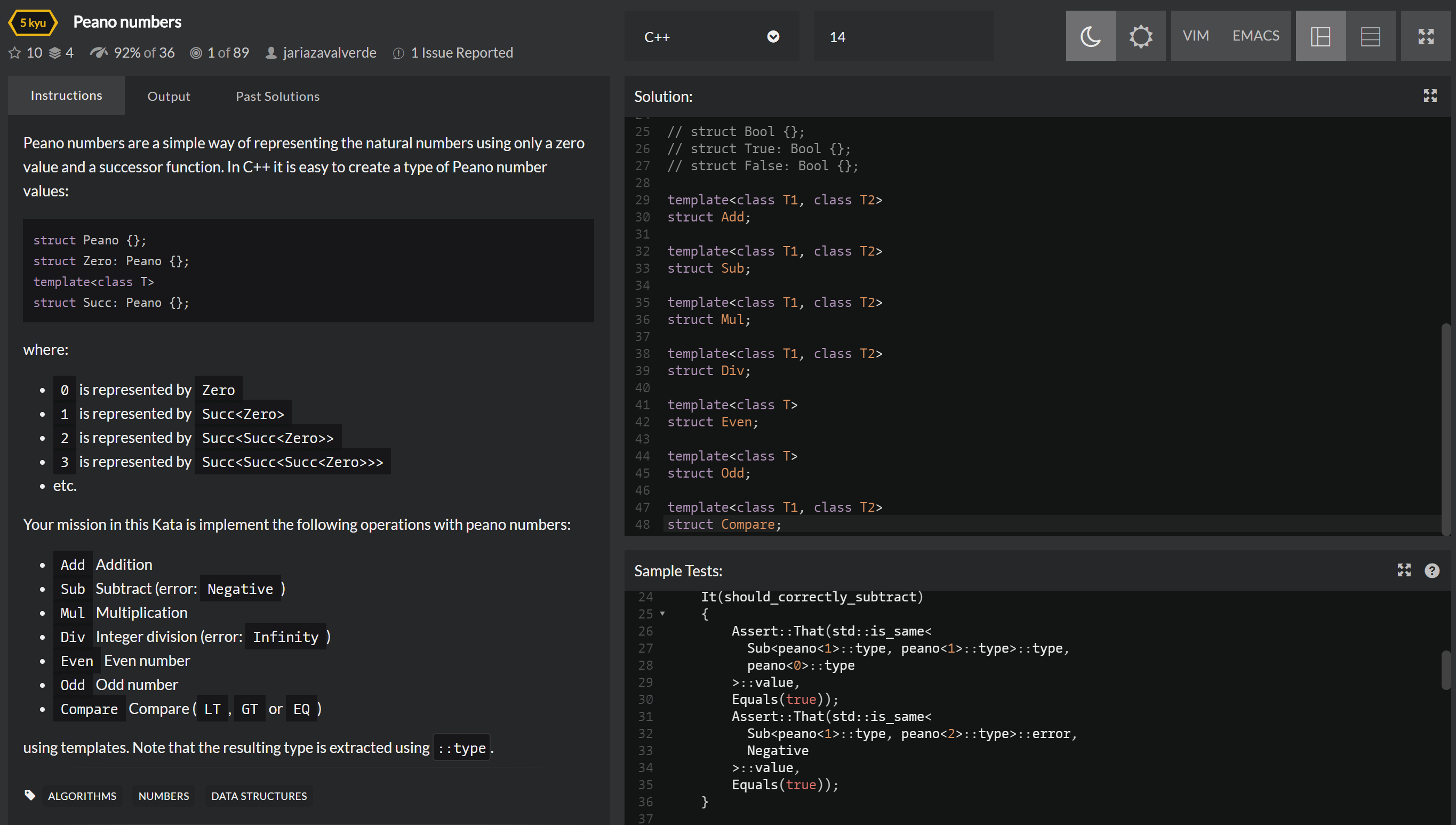
在 Peano numbers | Codewars 完成加减乘除、奇偶性和比较大小的撰写,并通过测试。
广告时间:

后记
当然我们还可以进一步「证明」我们印象中的结论,比如加法是满足交换律的,加法和乘法是满足分配率的,等等。这就是后话了。[:en]
Fundamentals
Function on Types
We all know that C++ templates can receive types as “parameters”. In the same spirit we could can “return values”s, so that we can form a function. The basic paradigm is the following:
template<class T>
struct Computed {
  using type = T;
}
In this way we constructed a type level function named Computed, with one parameter and result the parameter itself. We use the function as Computed<float>::type, the result being float itself.
Why an extra structwrapper instead of directly defining the “function”? That’s because partialization on using is not allowed. Such codes are invalid:
template <class T>
using computed<T> = T;

template<>
using computed<int> = double;
Partialization
template<class T>
struct Computed {
  using type = T;
}

template<>
struct Computed<int> {
  using type = double;
}Computed<bool>::type would become bool, while Computed<int>::type would (specially) be double. Certainly, there are a set of rules for the matching process. E.g. the most “specific” case gets matched first. This is somewhat from Haskell, where the first-defined case comes first. The equivalent code in Haskell is:data Type = Bool | Double | Int computed :: Type -> Type computed Int = Double computed t = t
Peano numbers
Zero for 0, and a Succ for the successive. Thus 1 would be Succ<Zero>, 2 would be Succ<Succ<Zero>>, and so on. This is but the heuristic demonstration of “induction”.struct Peano {};
struct Zero: Peano {};
template<class T>
struct Succ: Peano {};template<class T1, class T2>
struct Add {
using type = ???;
}2+1=3, or Add<Succ<Succ<Zero>>, Succ<Zero>>::type = Succ<Succ<Succ<Zero>>>. Certainly the latter expression is not valid C++, since there is no equality operator for types. Instead, we should use the std::is_same<T1, T2> function, which is predefined in <type_traits>. Or you can implement it yourself, again using partialization. This is a possible implementation:template<class T, class U>
struct is_same {
static constexpr bool value = false;
};
template<class T>
struct is_same<T, T> {
static constexpr bool value = true;
};template<>
struct Add<Succ<Succ<Zero>>, Succ<Zero>> {
using type = Succ<Succ<Succ<Zero>>>;
}0 + b = b, (Succ a) + b = Succ (a + b). In C++ they are:template<class T1, class T2>
struct Add;
template<class T>
struct Add<Zero, T> {
using type = T;
};
template<class T1, class T2>
struct Add<Succ<T1>, T2> {
using type = Succ<typename Add<T1, T2>::type>
};typename — the compiler doesn’t know whether the ::type is a member type or a member variable, so we need this keyword as a hint.std::is_same<Add<Succ<Succ<Zero>>, Succ<Zero>>::type, Succ<Succ<Succ<Zero>>>>::value == true or so. Such nesting of Succ is somewhat hard to read, so you can simply write a template to generate Peano types from integers:template<int v>
struct peano {
using type = Succ<typename peano<v - 1>::type>;
};
template<>
struct peano<0> {
using type = Zero;
};Then you can simplify it to Add<peano<2>::type, peano<1>::type>::type and peano<3>::type. The other opeartions like subtraction, multiplication and division can be similarly implemented, which are left as exercises.
Exercises:
Afterwords
We can further “prove” the assertions in our intuition, such addition is commutative, multiplication is distributive over addition, and so on. We may talk about this later.
[:]


huge 數學歸納需要專門去學習麼
我觉得最好去学一学实分析开头定义自然数的部分,自然就懂了。
这个配色看着很费眼睛诶,背景和字体的颜色反差太大了。